Dreamy Watercolor Easter Backgrounds: Soft Elegance for Digital Spring Projects
For designers, marketers, educators, and creative entrepreneurs, the arrival of spring brings opportunities to refresh digital content with seasonal themes. One effective way to elevate your Easter and spring-themed visuals is by using Dreamy Watercolor Easter Backgrounds, a collection designed to bring a soft, enchanting aesthetic to your digital projects. Whether you're crafting social media graphics, digital invitations, or blog headers, these backgrounds offer a versatile and elegant foundation that enhances your creative output without overwhelming your design workflow.
What Are Dreamy Watercolor Easter Backgrounds?
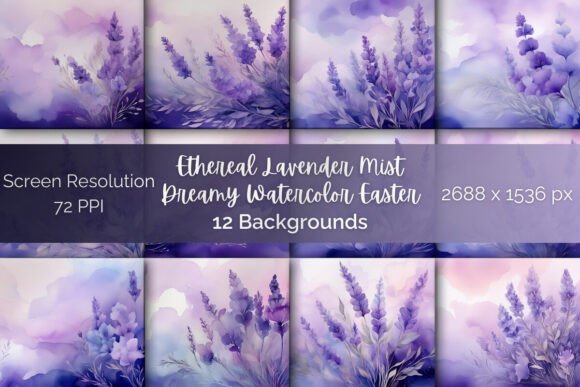
Dreamy Watercolor Easter Backgrounds is a curated set of digital background images featuring soft watercolor washes in soothing lavender, misty lilac, and airy periwinkle tones. These backgrounds are designed to evoke a sense of calm and elegance, making them ideal for spring-related digital content. Each background is AI-generated and professionally crafted to ensure high quality and seamless integration into various design projects.
With dimensions of 2688×1536 pixels at 72 PPI, these backgrounds are optimized for digital use. They come in high-quality JPG format, ensuring compatibility with most design tools and platforms used for web content, social media, and digital presentations.
How to Use Dreamy Watercolor Easter Backgrounds in Your Workflow
Integrating these backgrounds into your creative process can happen at multiple stages—before, during, or after your main design tasks. Here's how they can fit into different phases of your project:
Before You Begin: Planning and Inspiration
Start your design process by selecting a background that aligns with the mood and purpose of your project. The soft lavender and lilac tones can serve as a visual anchor, helping you choose complementary fonts, icons, and accent colors. Use these backgrounds as part of your moodboard or style guide to maintain consistency across multiple assets.
For marketers and content creators, selecting a background early can help streamline the planning of your visual calendar, especially for seasonal campaigns around Easter and spring events.
During Design: Seamless Integration and Layering
Once you've selected a background, import it into your preferred design tool—whether that's Adobe Photoshop, Canva, Figma, or any other digital design platform. Since the backgrounds are high-resolution and in JPG format, they will layer well with text, illustrations, and other design elements.
- Text readability: Ensure your text stands out by using light or dark overlays, depending on the background's tone.
- Consistency: Use the same background palette across multiple assets to maintain brand or campaign cohesiveness.
- Efficiency: Save time by reusing backgrounds across similar project types, such as multiple social media posts or digital invitations.
After Completion: Exporting and Publishing
After finalizing your design, export your file in the appropriate format for your intended use. Because these backgrounds are optimized for digital use, they are especially effective for web publishing, email marketing, and digital presentations.
For bloggers and educators, these backgrounds can be used as page headers or background elements in digital planners and course materials. For small business owners and freelancers, they provide a polished aesthetic for branding assets like social media headers and digital banners.
Compatibility and Integration with Other Tools
One of the key advantages of Dreamy Watercolor Easter Backgrounds is their compatibility with a wide range of design tools and platforms. Here’s how they can interact with your existing workflow:
- Canva: Upload the background directly to your Canva account and layer it with your text and graphics.
- Adobe Creative Suite: Use the JPG files in Photoshop or Illustrator to build layered compositions with vector elements.
- Figma: Import as a background image for digital mockups or UI designs.
- PowerPoint and Google Slides: Enhance your presentation slides with a soft, seasonal aesthetic.
These backgrounds also work well with other digital assets such as icons, fonts, and illustrations. When combined thoughtfully, they contribute to a cohesive visual language that enhances user experience and brand perception.
Practical Implementation Tips
Here are some actionable tips to help you make the most of these backgrounds in your daily or project-based workflow:
- Organize Your Files: Create a dedicated folder for your background assets and name them clearly (e.g., “LavenderMist_01.jpg”) to streamline future use.
- Test for Usability: Before finalizing a background, test it across devices and screen sizes to ensure readability and visual appeal.
- Maintain Consistency: If you're working on a multi-piece campaign, use the same color palette and background style across all assets.
- Layer Strategically: Add overlays or gradients if the background is too busy or doesn't contrast well with your text or icons.
- Repurpose Thoughtfully: Reuse backgrounds across different projects with minor tweaks to keep your content fresh and relevant.
Long-Term Value and Reusability
While these backgrounds are particularly well-suited for Easter and spring-themed projects, their soft, neutral tones allow for extended use beyond the season. They can be repurposed for wellness content, feminine branding, wedding invitations, or minimalist design projects.
For educators and bloggers, maintaining a library of such backgrounds ensures you always have a go-to visual resource for seasonal or thematic content updates. Their high resolution and digital optimization make them suitable for repeated use without compromising quality.
Conclusion: Enhancing Your Digital Aesthetic with Purpose
Dreamy Watercolor Easter Backgrounds offer more than just visual appeal—they provide a practical solution for integrating seasonal elegance into your digital workflow. Whether you're a marketer preparing for a spring campaign, a blogger updating your site's aesthetic, or an entrepreneur designing digital assets for a new product launch, these backgrounds can enhance your creative output with minimal effort.
By understanding how to select, layer, and repurpose these backgrounds effectively, you can streamline your design process while maintaining a high standard of visual quality. With thoughtful integration and consistent use, they become more than just a design asset—they become a part of your creative toolkit.